
Opinion & Analysis
Send in a video of your golf swing for a completely free lesson from V1 Sports


Here at GolfWRX, we want to help our readers improve at golf, the sport we all love. That means helping you make better buying decisions when it comes to equipment, arming you with knowledge about the swing, teaching you about the mental game, helping you develop fitness regimens, or any of the other many facets necessary to improve.
But we wanted to dive deeper, and give every reader the chance to get customized swing analysis and drills from some of the world’s best instructors.
That’s why we’re so excited to announce our partnership with V1 Sports in our new Lesson of the Day series. As part of this new endeavor, you will not only get a lesson from one of golf’s best instructors through the V1 Sports Platform, but the process is incredibly simple… and it’s FREE. This costs you absolutely nothing.
Recently, our Editor-in-Chief, and newly-left-handed golfer Andrew Tursky went through the process to get his swing analyzed by Matt Trimble, who’s credentials are below:
- A PGA Member A-6 Teaching professional,
- Arizona State University Karsten Golf Course (26 years) Golf Digest “Best in State Teachers” Arizona
- Volunteer Coach Arizona State Women’s Golf (2017 NCAA National Champions)
Here’s the video lesson Trimble sent back to Tursky:
To get your chance at a free lesson, just like the one above, here’s how it works:
For iOS
Step 1)
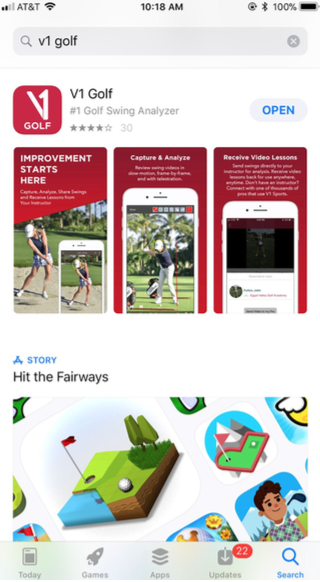
Open or download the V1 Golf App on iTunes, which is free.
Step 2)
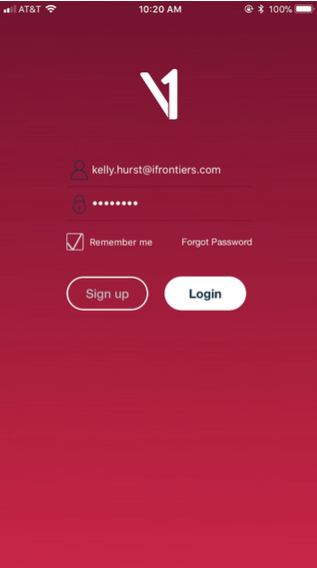
Login: If you already have a V1 Golf Account, log in. If not, select Sign Up on the login screen to create a new account. Once your account has been created, log in with your new credentials.
Step 3)
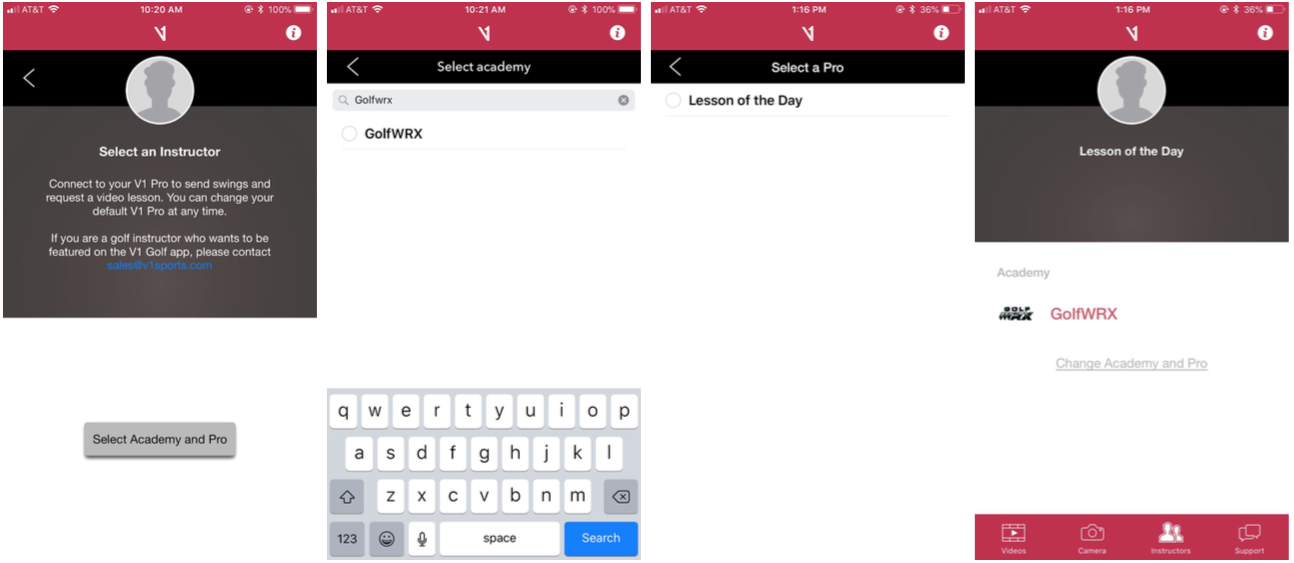
Connect to the GolfWRX Academy: Select Instructors on the bottom main menu. Then search for and select GolfWRX, then select Lesson of the Day.
Step 4)

Capturing or Importing a Swing Video – Select the Camera icon on the bottom menu. To start the recording, tap the red icon at the bottom center of the screen. Press the red icon again to end capture. To import video from your Photos, tap Import in the lower left corner of the video capture screen. This will open the Photos app and allow you to select a video to import.
Pro Tips:
- The stopwatch in the top right corner can be used to delay the start of capture if you are alone.
- Swipe left or right on the screen to activate the guide marker. The current mode is shown above the record button. This will add an alignment overlay to the viewfinder to help you determine the proper distance between subject and camera. Move closer or further away, until the subject fits approximately inside of the overlay area. This tool is only intended for camera alignment and will not appear in your recorded videos.
- Swing videos should be taken at waist level either face-on (directly in front of the golfer) or down-the-line (facing the target with the golfer directly in-between).
Step 5)
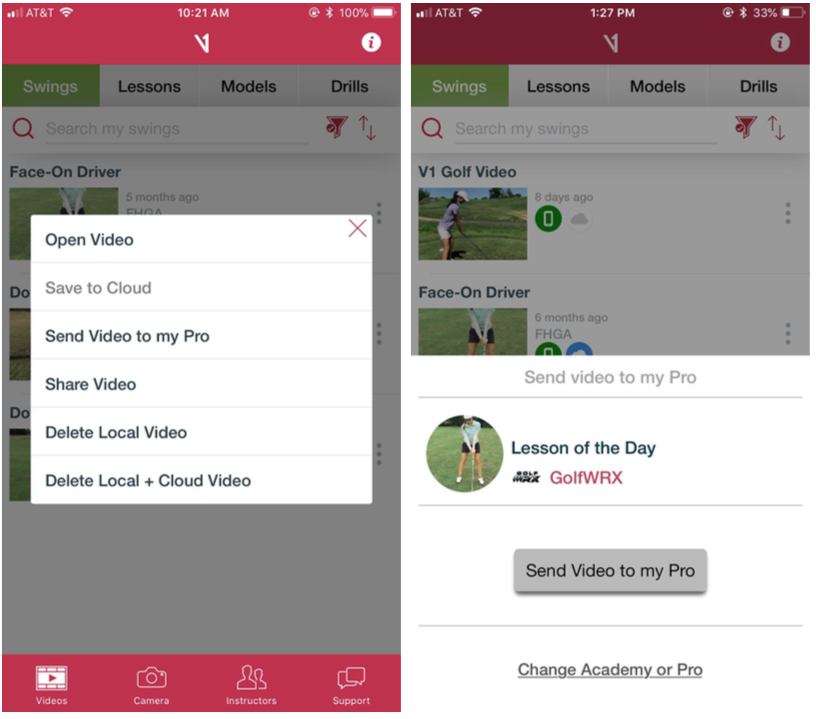
Submit a swing: Select Videos on the bottom main menu. Then select the three dot menu to the right of the video that you’d like to submit. Then select Send Video to my pro. Select Send Video to my Pro again on the confirmation page
That’s it! If your video gets selected, one of V1 Golf’s top instructors will analyze your swing, and your lesson video will be published on GolfWRX as a “Lesson of the Day.”
For Android
Step 1)

Open the V1 Golf App: If you haven’t already, download the free V1 Golf app from the Google Play store.
Step 2)
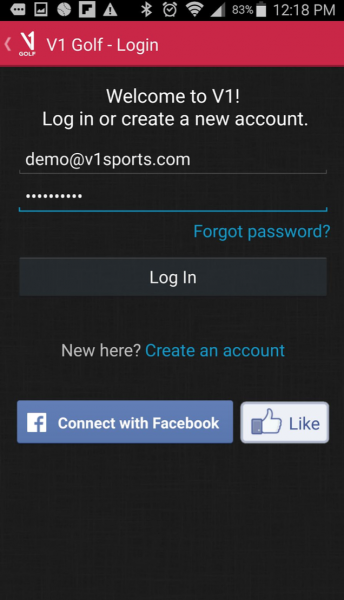
Login: If you already have a V1 Golf Account, log in. If not, select Create an Account on the login screen to create a new account. Once your account has been created, login with your new credentials.
Step 3)
Capturing or Importing a Swing Video – Press Camera icon on the app home page to activate the camera. When the camera starts, you will find all recording functions along the bottom of the display. To record a new video, press the large red record icon at the bottom center of the screen to start the capture process, then press the red button a second time to end capture.
To import an existing video from your Android Gallery, tap Import in the lower left corner instead of pressing record. This will open the Gallery feature and allow you to select which video to use.
To exit capture mode, press the Back button on your device.
Pro Tip: Swing videos should be taken at waist level either face-on (directly in front of the golfer) or down-the-line (facing the target with the golfer directly in-between).
Step 4)
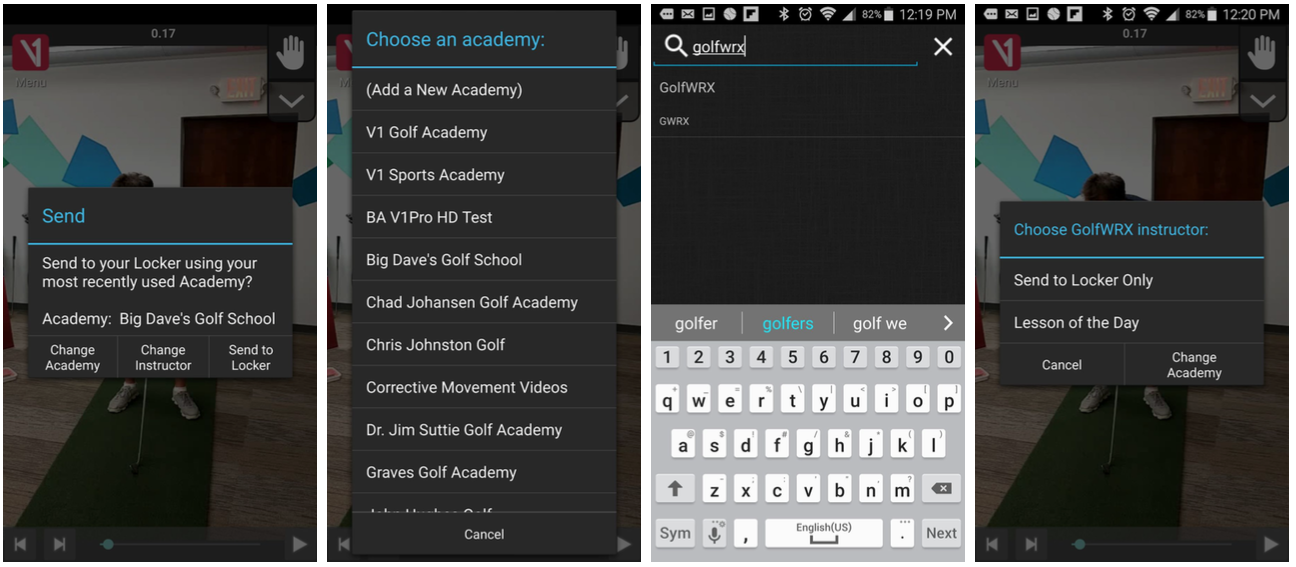
Open video to be submitted, then tap V1/Menu > Send to start the upload process. Click Change Academy to bring up the academy selection tool. Use the (Add a new Academy) option to search for GolfWRX, then select Lesson of the Day as the instructor.
Step 4)
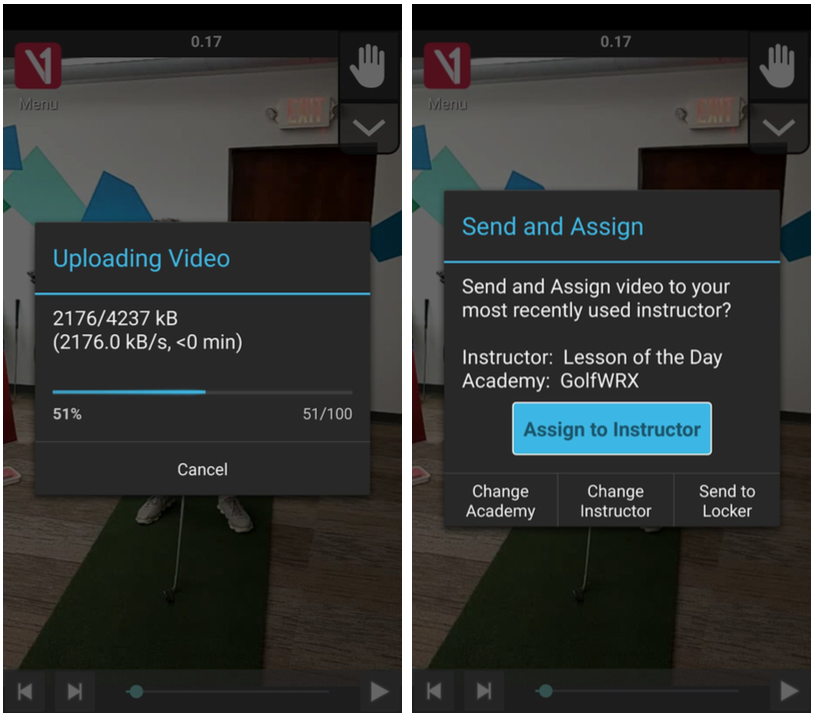
The video will automatically start uploading and be submitted to the Lesson of the Day campaign.
That’s it! If your video gets selected, one of V1 Sports’ top instructors will analyze your swing, and your lesson video will be published on GolfWRX as a “Lesson of the Day.”
If you have any issues at all when uploading your swing video, head over to V1 Sports support chat in the V1 Golf app. By entering your video into this system, you agree to have your video be used in a GolfWRX Front Page story. Thanks for participating!












This past Monday, I played in the U.S. Amateur local qualifier at Rock Creek Country Club in Portland, Oregon. A full tee sheet from 7:30 a.m. to 1:55 p.m., the top 11 scores would make it to the U.S. Amateur final qualifying.
I teed off at 10:48 a.m.. With the 7:30 am tee time, you can get a feel for the leaders’ pace, and they were off and running on the challenging setup at Rock Creek.
View this post on Instagram
Getting to the highlight of the round on the par five 17th, a drive up the left side and 212 yards left to the front hole location. I took out a 5-iron with plans of middle of the green. The ball ended up 8 feet left of the hole, pin high. A slight downhill putt dropped in for an eagle 3 on the 17th. With the cut line looking to be anywhere from -2 to even par. This was the boost I had been waiting for all day.
With making par from the trees on 18, it was time to wait for a potential playoff with a posted score of one under par 71.
Three hours later, it was playoff time. 8 players for 6 spots. I made par on the playoff hole, which was good enough to advance to the U.S. Amateur final qualifying in July. USGA qualifiers sure deliver on all of the emotions in golf!
Club Junkie
Building my 2026 gamer WITB: Ranking the contenders and new putter projects – Club Junkie Podcast
The annual What’s In The Bag build is underway, and on this episode of Club Junkie, Brian breaks down the clubs currently leading the race for a spot in his 2026 gamer setup. From drivers and fairway woods to irons, wedges, and shafts, he ranks the equipment that’s performing best and explains what’s separating the front runners from the rest of the field.
Brian also heads into the workshop to discuss several putter projects currently on the bench. From head options and shaft choices to build ideas and testing plans, he shares what he’s working on and which putters could become serious contenders for the bag this season.
If you’re a gear junkie who loves equipment testing, club building, and the never-ending pursuit of the perfect setup, this episode is for you.
Follow Club Junkie:
Instagram: @clubjunkiepod
TikTok: @clubjunkiepod
Threads: @clubjunkiepod
X: @ClubJunkiePod
Club Junkie
Tour Edge Exotics mini driver review + TaylorMade Spider ZT Max first look – Club Junkie

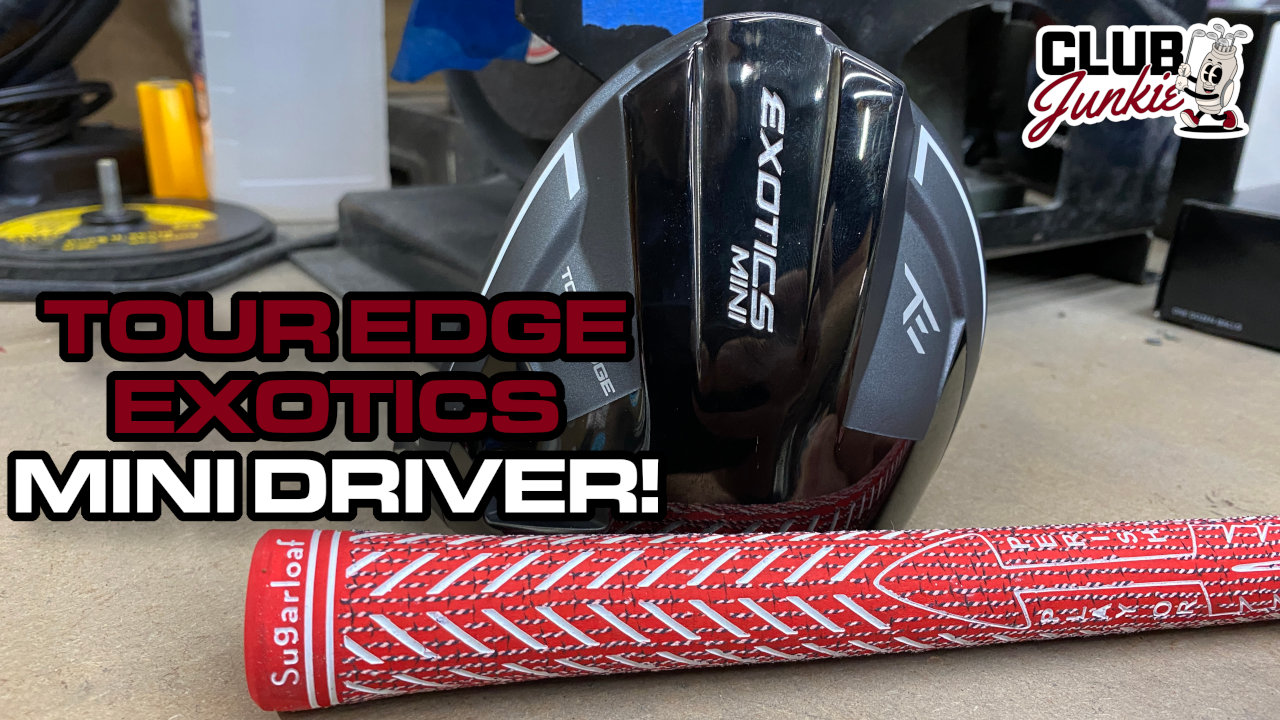
On this episode of Club Junkie, I put the new Tour Edge Exotics Mini Driver to the test and break down the performance, forgiveness, distance, and where it fits compared to a traditional driver or strong fairway wood. If you have been curious about adding a mini driver to the bag, this one is worth a look.
I also dive into the new TaylorMade Spider ZT Max putter that was recently spotted and discuss the growing zero torque putter trend. Plus, there is a closer look at the new Project X Titan Yellow shaft showing up on the PGA Tour and what makes it different from other profiles currently out there.

Justin Rose WITB 2026 (April): Full WITB breakdown with new McLaren irons

What’s the story behind Webb Simpson’s custom-stamped irons?

Cadillac Championship Tour Report: Spieth’s sizable changes, McLaren Golf launches, and more

Russell Henley’s winning WITB: 2026 Charles Schwab Challenge

Memorial Tournament Tour Report: Rory McIlroy, Cameron Young switch up drivers, and more

Kristoffer Reitan’s winning WITB: 2026 Truist Championship

Aaron Rai’s winning WITB: 2026 PGA Championship

Cameron Young’s winning WITB: 2026 Cadillac Championship

Details on Jason Day’s latest prototype Avoda iron setup

Nelly Korda WITB 2026 (April)


Alex Noren WITB 2026 (June)
Driver: Callaway Paradym Ai Smoke Max D (9 degrees @7, draw setting) Shaft: Graphite Design Tour AD VF 6 X 3-wood: Callaway...


Melanie Green WITB 2026 (June)
Driver: TaylorMade Qi4D (9 degrees) Shaft: Graphite Design Tour AD VF 5 S 3-wood: TaylorMade Qi4D (15 degrees) Shaft: Graphite Design Tour...


Sungjae Im WITB 2026 (June)
Sungjae Im had >14 clubs in his bag when photographed prior to the Memorial Tournament. Driver: Titleist TSi2 (8 degrees, B1...


Lucas Glover WITB 2026 (June)
Lucas Glover had >14 clubs in his bag when photographed prior to the Memorial Tournament. Driver: Titleist GTS2 (10 degrees, B2 SureFit...
-
 News6 days ago
Russell Henley’s winning WITB: 2026 Charles Schwab Challenge
-
 Equipment1 day ago
Memorial Tournament Tour Report: Rory McIlroy, Cameron Young switch up drivers, and more
-
 Whats in the Bag3 weeks ago
Aaron Rai’s winning WITB: 2026 PGA Championship
-
 Equipment3 days ago
Details on Jason Day’s latest prototype Avoda iron setup
-

 Tour Photo Galleries3 weeks ago
Photos from the 2026 CJ Cup Byron Nelson
-

 Equipment2 weeks ago
CJ Cup Byron Nelson Tour Report: Koepka and Kim’s newest putters finally get hot
-

 News1 week ago
Charles Schwab Challenge Tour Report: MacIntyre, Åberg and Spaun all switch putters, TaylorMade launches new Spider
-

 Equipment1 week ago
Details on J.J. Spaun’s surprise putter switch


Pingback: V1 Sports Golf Login - LoginCrunch
Ab
Sep 11, 2018 at 7:46 pm
What a stupid exercise in futility! Nothing can come of it other than confirming your incompetence.